How to Convert From DVD to Digital & Mp4 Using an Online Service
Convert DVDs to MP4 online quickly and securely. Preserve your videos in digital format, compatible with all devices. No software or hassle needed!
Contents
Remember when DVDs were all the rage, and you could amass a collection worthy of envy? It was really a lot of fun to go hunt through the second hand stores and specialty shops, with the hope of finding some rare pressing.
And then we spent the better part of the late 90s and into the 2010s burning our home movies onto DVD discs, and (potentially even with our help) transferring old tape media over to DVDs as well.
Now, those discs tend to spend more time collecting dust than playing movies. And that's a real problem if the content that’s on them isn't something that's readily available elsewhere. It could be the Ocean Media dub of Dragonball Z, or it could be your family home videos. Either way, DVD is clearly no longer the right home for them, for a variety of reasons. It's all about transferring these discs to a digital format.
This article, lovingly crafted by the vintage-savvy pen of Forever Studios' own blog team, Vintage University, aims to make your transition from discs to digital as smooth as your favorite movie soundtrack.

Okay, so, I have a serious problem deciding between these two when it comes to “favorite movie soundtrack”. On the one hand, you have Kenny Loggins’ “Highway to The Danger Zone”, and Berlin’s “Take my Breath Away”. But on the other, you have that MASTERFUL Giorgio Moroder soundtrack that OOZES 80’s Miami from start to finish. It’s almost impossible to decide.
We’ll take you through DIY methods and lightly nudge you toward the truly hassle-free alternative,letting a professional service handle your digital transfers with a pro DVD to digital service. Get ready to learn how to turn "what now?" into "wow!" as we dive into the world of DVD-to-digital conversion.
And before you ask, yes, that includes your copy-protected DVDs.
Why it's Time to Transfer Optical Media (CD & DVD) to Digital Files
Modern laptops and streaming devices have rudely kicked out optical drives like that one guest at a party who just won't leave, and insists on playing Take on Me for the 5th time in a row, swearing that they can totally hit that high note in the chorus. Yeah Brian. I am talking about you.

“Brian! Stop dude! BRIAN. I’m turning this off!”
Without an optical drive, playing DVDs today feels like trying to find a payphone in an age of iPhones! And we're going to assume this is why you're likely searching for info on the DVD to Mp4 conversion process.
MOST DVD PLAYERS ARE REACHING "END OF LIFE"
Let's talk about those aging DVD players. Like much of our beloved '90s tech, their lifespan is dwindling. Even the best bits of consumer electronics don't seem to do well past the 30 year mark.

These little guys have a nasty habit of swelling up and then exploding after a couple of decades. And when that happens, it’s typically Game Over for whatever device they live inside of.
Replacements can be pricey and impractical if you're looking for a fairly good unit, with a lot of later production units being really cheaply made. Which makes it a lose-lose situation regardless of which direction you go. You're always at risk of pulling out the player and finding it isn't as enthusiastic about movie night as you are.
DISC ROT IS MURDERING EVEN WELL PRESERVED DISCS
Even your prized DVD collection isn't safe from the Grim Reaper, otherwise known as Father Time. "Disc Rot" is now affecting a ton of optical discs that are a decade-plus old. Environmental villains like heat and humidity can wreak havoc on your discs, resulting in skipping audio tracks and missing video.

Image Credit By: https://www.avclub.com/warner-bros-replacing-disc-rot-dvd
And even in the event that you have taken perfect care of your discs, some discs have begun rotting for no particular reason at all, just because the production processes or materials used to make the discs were substandard or cheap. And again, before you even ask, yes this does include your retail pressed, copy-protected DVDs.
In contrast, digital files are like the superheroes of the storage world. They're resilient, versatile, and can easily be backed up, copied, and shared. There's no great reason to trust crucial memories to something so delicate when digital copies are an easily accessed alternative. Especially with a solid DVD to digital service at your disposal.
How Do I Get Digital Copies of My DVD Videos?
So we've recognized that it is high time to move those favorite irreplaceable media moments from DVD to digital formats, and even maybe the cloud. But how on earth does one crack open the world of DVD conversion without getting in over their head? Unfortunately it's not as easy as just copying data off a disc to create digital copies. This requires either software tools or professional help.

If it was this easy, we wouldn’t exactly have a good business case here.
There are options galore for the ambitious DIY'er when it comes to what's referred to as "ripping" software tools. These programs are what you would use to create digital copies of your video DVDs. Even better, many of the good ones are totally free to use.
Though it's tempting to try to download one and get going, the process involves way more than just dragging and dropping files. There's a lot of configuration and processing involved. So if you're not that technically inclined…

If this is a familiar looking facial expression to you, feel free to give us a call.
From picking the best file format to navigating the different disc-ripping softwares and their capabilities, the journey can be filled with frustration and techie jargon. Frankly, for the uninitiated, tackling this task could have you pulling your hair out. Or in the case of many of our customers, reaching out for professional reinforcements from our DVD to digital service.
WHY CAN’T I JUST DRAG & DROP FILES OFF A DVD VIDEO DISC?
Unlike simple image files or other basic digital files, DVD video can’t just be drag-and-dropped onto your desktop like you would with pretty much any other type of modern digital media. I mean, you can do it, but there's nothing you could do with it.
The content is protected and encoded in such a way that converting it to the kind of digital video you're probably used to requires an extra touch of technical skill.
DVD VIDEO IS ENCODED ONTO THE DISK SPECIFICALLY FOR DVD PLAYER PLAYBACK
When DVDs are created, video information is encoded using a specific format that isn't directly readable by your computer’s operating system. On the contrary, it's meant to be accessed by a DVD video player, which has a whole bunch of special code and stuff built in to turn that data into video, on the fly, during playback.
This is why you can't just pop your DVD into an optical drive and slide those precious movies or memories onto a Memory Stick.
What Was That Whole "DVD Ripping" Thing Again?
This is where the marvelous process of "ripping" comes into play, translating the DVD contents into digital video files. Using specialized software tools, ripping essentially acts like a bilingual translator, converting the DVD file data into a language,or format,that your devices understand and can play.

Getting to this point requires not just DVD ripping software, but enough technical knowhow to output files that will work on your preferred devices.
Ripping does involve a few technical steps, like selecting output formats (hello, MP4!) that best suit your device needs. And while some intrepid self-made techies might consider navigating this process solo, it does involve some tech know-how that's started to disappear.
Ironically, this skill is something that kind of "came and went" as far as general tech user knowledge goes. For Millennials, ripping CDs and DVDs was a daily undertaking, with many kids from the 00's swapping discs around on the daily to rip to Mp3 audio and AVI or MOV video. But as the optical disc fell back out of fashion, so did the ubiquity of disc ripping knowledge.

If you were ripping CD’s to MP3 and sharing them on this platform, I have to question why you’re reading this article, actually. Napster was THE place to share freshly ripped CD audio back in the early 00’s.
For those who want the job done seamlessly and stress-free, a DVD to digital transfer service like Forever Studios comes highly recommended. We help transform those classic DVDs into user-friendly, shareable moments, sparing you the technical mumbo-jumbo and ensuring your digitized memories are secure and ready for modern viewing.
But if you want some DIY knowledge, who are we to withhold it from you?
What File Format is The Best to Digitize DVDs to?
The transition from DVD discs to digital files is a bit like updating your wardrobe; it's all about finding something that fits better and looks smoother. Speaking of smooth fits, when it comes to digitizing DVDs, the MP4 format is the cozy hoodie of digital files.

Just like a slick hoodie, Mp4 Video files pretty much “go with anything”. You can’t miss. Just like this guy’s “fit”.
Not only does it offer excellent video quality, but MP4 is also versatile enough to play nice with nearly all modern devices, from your smartphone to the smart fridge (okay, maybe not the fridge, but who knows?).
With MP4 files, you're also sidestepping the nightmarish land of bulky files, as they are compact enough to leave plenty of room on your hard drive, USB Drive or cloud storage.
MP4 is honestly like the Swiss Army Knife of file formats. It’s built to work effortlessly across platforms like Google Photos and any mobile device you might have. With the rise of high-speed internet connections, downloading or streaming MP4 files is a breeze without the long buffering times reminiscent of trying to watch anything through a dial-up connection.
Plus, the compression technology in MP4 ensures that your digital media retains its quality without ballooning in size,a win-win for nearly everyone but professional video production outfits. It's the perfect video format for 99% of people.
What Software is Available for DIY Disc Ripping?
Venturing into the world of DIY disc ripping can feel a bit like jamming a square peg into a round hole. It looks generally easy, and yeah, something is happening when you click that "start" button - but the result just isn't all that satisfying given the effort, especially if it doesn't work right.

On second thought, this actually looks rather satisfying.
That said, why don't we talk about a couple of the software programs that we use here to crack open DVDs? We can't take the time to walk through all of the functions and specificity here, but there are plenty of guides out there if you want to really dig into it. This should help you gauge whether or not you're either equipped or willing to take on the task of digitizing an entire DVD collection.
If your eyes start glazing over a bit reading about these pieces of software, we're going to recommend skipping to the next section, which talks about how to get your discs handled by our team here at Forever Studios.
RIPPING DVDS WITH HANDBRAKE
HandBrake is a free software that lets you convert DVDs into digital files. You can use it on Windows, Mac, and Linux computers. It mainly works with DVDs that are not copy-protected, which means it might not be able to handle some commercial DVDs, especially those from companies like Disney, without additional tools like VLC's libdvdcss library.

Handbrake is really powerful, and is our typical go to program for discs that “play nice” and cooperate with us.
Basic Features of HandBrake
-
Free to Use: HandBrake doesn't cost anything to download and use.
-
Cross-Platform: It's available for Windows, Mac, and Linux users.
-
Digital Conversion: You can convert DVDs to popular formats like MP4, MKV, and WebM.
-
Presets Available: The software offers various presets, which are like templates, to help you convert your DVDs based on where you want to play them (like on a TV, phone, or computer).
-
Customization Options: You can change settings like video quality, resolution, subtitles, audio tracks, and more. There are advanced options you can adjust if you want to dive deeper into video encoding settings.
Usability for Beginners
For someone new to ripping DVDs, HandBrake can be somewhat challenging to use for a few reasons:
-
Technical Settings: Although there are presets, the range of options and settings might be overwhelming if you're not familiar with video and audio encoding.
-
No Decryption for Protected DVDs: HandBrake can't handle DVDs with copy protection on its own. If you're dealing with such DVDs, you might need additional tools or plugins, which can complicate the process.
-
Learning Curve: While the user interface is relatively straightforward, understanding what each setting means and how it affects the output requires some learning.
-
Time Consumption: The conversion process can take a long time depending on the length of the DVD and the settings you’ve chosen, which might be frustrating for new users.
GETTING ALL THE DATA OFF THE DISC WITH CDROLLER
CDroller is a software program designed to recover data from optical discs such as CDs, DVDs, and Blu-ray discs. Its primary functionality is to retrieve files that may be inaccessible due to scratches, damage, or file system errors on the disc. The software can be particularly useful for salvaging important data from older or corrupted discs that conventional methods might not be able to access. Here's how CDroller works and its usability considerations:

CDroller is what we pull out when a disc decides it DOESN’T want to play nicely.
Basic Functionality of CDroller:
-
Data Recovery: CDroller can recover files from damaged or unreadable discs. It uses advanced algorithms to bypass read errors and extract files, even if the disc is physically damaged.
-
Disc Analysis: The software can perform detailed analysis of the disc's structure and detect issues that might be causing data inaccessibility.
-
File Extraction: Once the issues are identified, CDroller extracts files that are still intact, allowing users to save them to a more reliable storage medium like a hard drive or USB stick.
-
IsoBuster Integration: CDroller often works in conjunction with another tool, IsoBuster, which is renowned for its ability to extract data from various disc formats and file systems.
-
Creation of ISO Images: The program can create ISO image files from the optical discs, which can be useful for archiving purposes or further data extraction.
Ease of Use for Novices:
-
User Interface: CDroller features a straightforward and user-friendly interface. However, the technical nature of data recovery can still pose challenges to someone without prior experience in handling optical disc issues.
-
Guided Recovery: The software provides step-by-step guidance for data recovery, which can help less experienced users navigate the process more easily. It often includes wizards that simplify complex tasks.
-
Technical Knowledge: Although CDroller is designed to be accessible, a basic understanding of optical disc technology and data recovery concepts can be beneficial. Users without this background might find certain aspects of the process, such as interpreting error messages or deciding on recovery settings, somewhat challenging.
-
Support and Documentation: CDroller comes with comprehensive documentation and support resources. These resources can aid users in understanding the more technical aspects of the recovery process.
-
Trial Version: CDroller typically offers a trial version, allowing users to test its features before committing to a purchase. This trial can help users determine if the software meets their needs and if they find it easy to use.
WHY WOULD I WANT TO USE A PROFESSIONAL SERVICE INSTEAD OF DOING THE WORK MYSELF?
Converting DVD contents to digital files might seem like a relatively easy DIY project at first glance, especially if you're really eager to relive generations of memories at the click of a button, and you consider yourself relatively tech savvy. However, to be totally honest, if it were really that simple we wouldn't have any customers.
So let's look at the reasons why many opt for a professional DVD transfer service.
IT REQUIRES A FAIR AMOUNT OF HOMEWORK FOR MOST PEOPLE
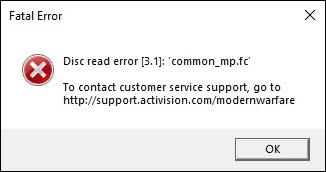
First off, ripping DVDs requires a pretty solid combo of tech knowledge and media knowledge. So even if the ripping software can technically start grabbing the contents of a disc at a single click, that's not going to be worthwhile if you didn't configure everything properly beforehand. Basically, if you don't already know what a "bitrate" or a "codec" is, this probably isn't going to be a fun project.

Image Credit By: https://www.drivereasy.com/wp-content/uploads/2021/05/disc-read-error-featured.jpg
So you may have grabbed yourself a copy of Handbrake and an Optical Drive, but navigating through various output formats, and dealing with potential copy-protected DVDs is still probably going to be a pain. Especially when you've ripped the same disc 5 times, and still haven't gotten the quality (or even the correct footage) you wanted.
THERE IS NO FAST FORWARD BUTTON WHEN IT COMES TO TIME INVESTMENT
Additionally, the time investment is enormous. What starts with optimism,"I'll tackle my collection this weekend!",often spirals into weeks or even months of digital drudgery. Take it from this professional: By the time you've heard the "completed disc" noise from Handbrake for the 30th time, you're going to start getting pretty annoyed by it.
WE GUARANTEE OUR WORK, AND HAVE WAY MORE EXPERIENCE CLEARING HURDLES YOU DON'T EVEN KNOW ABOUT YET. NO OFFENSE
Lastly, here's a bit of real talk. Like any moderately tech oriented undertaking, you're going to make it to maybe disc 5 or 6 before you encounter the first glitch or error message that you don't understand. Search your feelings, you know this to be true. And you may find yourself devoting hours to just finding a way to get the video or data off of that one disc because it's SO IMPORTANT.

This gentleman here is getting paid to fiddle with uncooperative discs for hours. You likely aren’t. That may constitute a pretty serious gap in motivation.
And that first hurdle is something that we've seen a million times. So is the second one, and the third. We can basically sleepwalk through the inevitable technical problems that are going to sap the fun out of this project for you, and then guarantee the results.
And that's before we even get to the topic of damaged or aged discs. Our team at Forever Studios knows how to pull the data off of even the worst discs, kicking and screaming.
So if your disc collection includes a bunch of video that you know you just can't live without, your best shot of getting the maximum amount of it preserved properly is going to be with us.
How Does The Process Work for Using a DVD to Digital Service?
Okay, so at the end of this whole thing, you've come to the conclusion that a pro DVD digitizing service is right for you. Thankfully, converting DVD discs to digital files this way has never been easier, especially with Forever Studios’ DVD transfer service guiding you every step of the way. Here's how our seamless process works:
-
Order: Start by visiting Forever Studios' website to order the DVD transfer service online, or give us a call to speak with our Customer Care team. We offer a range of output formats suitable for various devices, including digital downloads for mobile devices, USB Drives, and even our own specially built Forever Cloud online service.
-
Shipping: Try out our Door to Door ship kit service. We'll provide you with the exact size shipping container you need. Just pack your DVD discs securely and send them to Forever Studios using the shipping label we provide in the kit.
-
Conversion: Once received, Forever Studios’ team uses advanced Optical Drive technology to extract DVD contents. They convert these into high-quality digital files, preserving all your audio tracks and DVD file data effortlessly.
-
Delivery: Finally, receive your precious memories in a digital format via your chosen method,be it a drive for your USB port or upload to our Forever Cloud for easy access and backup.
So, sit back, relax, and let Forever Studios handle the techy details. You can focus on reliving those special memories without any fuss or muss! We're just a click or phone call away.

Ready to digitize it right the first time?
Bring your tapes, film, and photos to the team that treats every project as irreplaceable — handled in-house in Boca Raton, never outsourced.